GitHub OAuth Login with FastAPI - Complete Tutorial with Code Examples (2025)
Learn how to implement GitHub OAuth login in FastAPI. Step-by-step tutorial with code examples covering OAuth setup, authentication flow, user data handling, and security best practices.
This tutorial is direct and practical. I focus on code that works, not theory.
You can copy the examples and adapt them to your needs.
Introduction
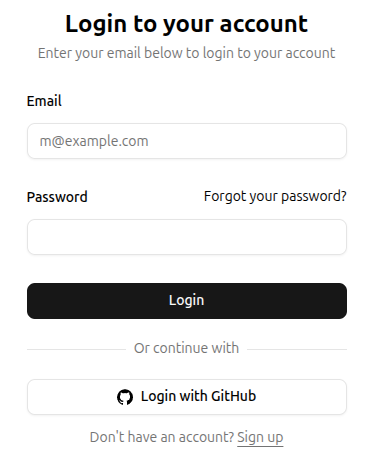
Adding "Login with GitHub" to your FastAPI app lets users sign in without creating a password.
This FastAPI GitHub OAuth tutorial shows you how to implement GitHub authentication with complete code examples.
What you'll learn:
- Set up GitHub OAuth App
- Implement OAuth 2.0 flow in FastAPI
- Handle user authentication and sessions
- Store user data securely
- Production deployment tips
Prerequisites: Basic Python and FastAPI knowledge, GitHub account.
Why GitHub OAuth?
GitHub OAuth is perfect for developer tools and SaaS apps because:
- Your users already have GitHub accounts
- No password management needed
- Users trust GitHub's security
- Free to implement
- Get access to user's public info (name, email, avatar)
Popular apps using GitHub OAuth: Vercel, Netlify, Railway, Render.
How OAuth Works
Here's the flow in simple terms:
- User clicks "Login with GitHub" on your site
- You redirect them to GitHub's authorization page
- User approves access to their GitHub account
- GitHub redirects back to your site with a code
- You exchange the code for an access token
- You use the token to fetch user data from GitHub
- You create a session and log the user in
This takes about 2-3 seconds for the user.
Initial Setup
Install Dependencies
pip install fastapi uvicorn httpx pydantic-settings python-jose[cryptography]
What each package does:
httpx: Make HTTP requests to GitHub APIpydantic-settings: Manage environment variablespython-jose: Create secure JWT tokens for sessions
Create GitHub OAuth App
Go to GitHub Developer Settings and create a new OAuth App:
- Click "New OAuth App"
- Application name:
YourApp (Development) - Homepage URL:
http://localhost:8000 - Authorization callback URL:
http://localhost:8000/auth/github/callback - Enable Device Flow: Leave unchecked (not needed for web apps)
- Click "Register application"
Save these values:
- Client ID:
Ov23li...(starts with "Ov", safe to expose publicly) - Client Secret: Click "Generate a new client secret" and copy it immediately (keep this secret!)
Note: This is your development OAuth app. You'll create a separate production OAuth app when deploying (see "Production Deployment" section).
Environment Setup
Create a .env file:
GITHUB_CLIENT_ID=your_localhost_client_id_here
GITHUB_CLIENT_SECRET=your_localhost_client_secret_here
JWT_SECRET_KEY=your_random_secret_key_here_min_32_chars
DOMAIN=http://localhost:8000
Generate a secure JWT secret:
python -c "import secrets; print(secrets.token_urlsafe(32))"
Basic FastAPI Setup
Create main.py:
from fastapi import FastAPI, Request, Depends, HTTPException
from pydantic_settings import BaseSettings, SettingsConfigDict
import httpx
from jose import jwt, JWTError
from datetime import datetime, timedelta

class Settings(BaseSettings):
    github_client_id: str
    github_client_secret: str
    jwt_secret_key: str
    domain: str = "http://localhost:8000"

    model_config = SettingsConfigDict(env_file=".env")

settings = Settings()

app = FastAPI()

@app.get("/")
def home():
    return {"message": "FastAPI + GitHub OAuth"}
Run it:
uvicorn main:app --reload
Implement OAuth Flow
Step 1: Login Endpoint
This redirects users to GitHub:
from fastapi.responses import RedirectResponse

@app.get("/login/github")
def login_github():
    github_auth_url = (
        f"https://github.com/login/oauth/authorize"
        f"?client_id={settings.github_client_id}"
        f"&redirect_uri={settings.domain}/auth/github/callback"
        f"&scope=read:user user:email"
    )
    return RedirectResponse(github_auth_url)
What's happening:
client_id: Identifies your app to GitHubredirect_uri: Where GitHub sends users after approvalscope: What data you want access toread:user: Get user profile infouser:email: Get user email addresses
Additional scopes you might need:
repo: Access to repositories (if building a Git tool)read:org: Organization membership
See GitHub OAuth scopes for all options.
Step 2: Callback Endpoint
GitHub redirects here with a code:
@app.get("/auth/github/callback")
async def github_callback(code: str):
    access_token = await _exchange_code_for_access_token(code)
    github_user_info = await _get_user_info_from_github(access_token)

    # TODO: Save user to database here

    # Create JWT token for session
    jwt_token = create_jwt_token(user)

    # Redirect to dashboard with token
    response = RedirectResponse(url="/dashboard")
    response.set_cookie(
        key="access_token",
        value=jwt_token,
        httponly=True,
        secure=True,  # Use in production with HTTPS
        samesite="lax",
        max_age=60 * 60 * 24 * 7  # 7 days
    )

    return response


async def _exchange_code_for_access_token(code: str) -> str:
    # Exchange code for access token
    async with httpx.AsyncClient() as client:
        token_response = await client.post(
            "https://github.com/login/oauth/access_token",
            data={
                "client_id": settings.github_client_id,
                "client_secret": settings.github_client_secret,
                "code": code,
            },
            headers={"Accept": "application/json"},
        )

    token_data = token_response.json()
    access_token = token_data.get("access_token")

    if not access_token:
        raise HTTPException(status_code=400, detail="Failed to get access token")

    return access_token


async def _get_user_info_from_github(access_token: str) -> dict:
    async with httpx.AsyncClient() as client:
        user_response = await client.get(
            "https://api.github.com/user",
            headers={"Authorization": f"Bearer {access_token}"},
        )

        email_response = await client.get(
            "https://api.github.com/user/emails",
            headers={"Authorization": f"Bearer {access_token}"},
        )

    user_data = user_response.json()
    emails = email_response.json()

    primary_email = next(
        (email["email"] for email in emails if email["primary"]),
        user_data.get("email")  # Fallback to public email
    )

    return {
        "github_id": user_data["id"],
        "username": user_data["login"],
        "email": primary_email,
        "name": user_data.get("name"),
        "avatar_url": user_data.get("avatar_url"),
    }
What's happening:
- Exchange authorization code for access token
- Use access token to fetch user data from GitHub API
- Get user's primary email (GitHub emails can be private)
- Create a session token (JWT)
- Set cookie and redirect to dashboard
Note on emails: Some users hide their email. Always check user:email scope and handle missing emails gracefully.
Step 3: JWT Token Creation
Create session tokens:
def create_jwt_token(user: dict) -> str:
    payload = {
        "user_id": user["github_id"],
        "username": user["username"],
        "email": user["email"],
        "exp": datetime.utcnow() + timedelta(days=7)
    }
    token = jwt.encode(
        payload,
        settings.jwt_secret_key,
        algorithm="HS256"
    )
    return token

def decode_jwt_token(token: str) -> dict:
    try:
        payload = jwt.decode(
            token,
            settings.jwt_secret_key,
            algorithms=["HS256"]
        )
        return payload
    except JWTError:
        return None
Why JWT?
- Stateless (no database lookup on every request)
- Contains user info
- Cryptographically signed (tamper-proof)
- Has expiration built-in
Protect Routes
Create a dependency to get the current user:
from fastapi import Cookie

def get_current_user(access_token: str = Cookie(None)):
    if not access_token:
        raise HTTPException(
            status_code=401,
            detail="Not authenticated"
        )

    user_data = decode_jwt_token(access_token)
    if not user_data:
        raise HTTPException(
            status_code=401,
            detail="Invalid or expired token"
        )

    return user_data

@app.get("/dashboard")
def dashboard(current_user: dict = Depends(get_current_user)):
    return {
        "message": f"Welcome {current_user['username']}!",
        "user": current_user
    }

@app.get("/api/me")
def get_me(current_user: dict = Depends(get_current_user)):
    return current_user
Now any route with Depends(get_current_user) requires authentication.
Add Database Storage
You should save users to a database. Here's an example with SQLAlchemy:
from sqlalchemy import create_engine, Column, Integer, String
from sqlalchemy.ext.declarative import declarative_base
from sqlalchemy.orm import sessionmaker, Session

# Database setup
SQLALCHEMY_DATABASE_URL = "sqlite:///./app.db"
engine = create_engine(SQLALCHEMY_DATABASE_URL)
SessionLocal = sessionmaker(autocommit=False, autoflush=False, bind=engine)
Base = declarative_base()

# User model
class User(Base):
    __tablename__ = "users"

    id = Column(Integer, primary_key=True, index=True)
    github_id = Column(Integer, unique=True, index=True)
    username = Column(String, unique=True)
    email = Column(String, unique=True, nullable=True)
    name = Column(String, nullable=True)
    avatar_url = Column(String, nullable=True)

# Create tables
Base.metadata.create_all(bind=engine)

# Database dependency
def get_db():
    db = SessionLocal()
    try:
        yield db
    finally:
        db.close()
Update callback to save user:
from fastapi import Depends

@app.get("/auth/github/callback")
async def github_callback(code: str, db: Session = Depends(get_db)):
    # ... (previous code to get user data from GitHub)

    # Check if user exists
    db_user = db.query(User).filter(User.github_id == user_data["id"]).first()

    if db_user:
        # Update existing user
        db_user.username = user_data["login"]
        db_user.email = primary_email
        db_user.name = user_data.get("name")
        db_user.avatar_url = user_data.get("avatar_url")
    else:
        # Create new user
        db_user = User(
            github_id=user_data["id"],
            username=user_data["login"],
            email=primary_email,
            name=user_data.get("name"),
            avatar_url=user_data.get("avatar_url"),
        )
        db.add(db_user)

    db.commit()
    db.refresh(db_user)

    # Create JWT with database user ID
    jwt_token = create_jwt_token({
        "user_id": db_user.github_id,
        "username": db_user.username,
        "email": db_user.email,
    })

    # ... (rest of the code)
Frontend Integration
Simple HTML example:
<!DOCTYPE html>
<html>
<head>
    <title>Login with GitHub</title>
    <style>
        .github-button {
            display: inline-flex;
            align-items: center;
            gap: 10px;
            padding: 12px 24px;
            background: #24292e;
            color: white;
            text-decoration: none;
            border-radius: 6px;
            font-size: 16px;
            font-weight: 600;
        }
        .github-button:hover {
            background: #1b1f23;
        }
    </style>
</head>
<body>
    <h1>Welcome to My App</h1>
    <a href="/login/github" class="github-button">
        <svg height="20" width="20" viewBox="0 0 16 16" fill="currentColor">
            <path d="M8 0C3.58 0 0 3.58 0 8c0 3.54 2.29 6.53 5.47 7.59.4.07.55-.17.55-.38 0-.19-.01-.82-.01-1.49-2.01.37-2.53-.49-2.69-.94-.09-.23-.48-.94-.82-1.13-.28-.15-.68-.52-.01-.53.63-.01 1.08.58 1.23.82.72 1.21 1.87.87 2.33.66.07-.52.28-.87.51-1.07-1.78-.2-3.64-.89-3.64-3.95 0-.87.31-1.59.82-2.15-.08-.2-.36-1.02.08-2.12 0 0 .67-.21 2.2.82.64-.18 1.32-.27 2-.27.68 0 1.36.09 2 .27 1.53-1.04 2.2-.82 2.2-.82.44 1.1.16 1.92.08 2.12.51.56.82 1.27.82 2.15 0 3.07-1.87 3.75-3.65 3.95.29.25.54.73.54 1.48 0 1.07-.01 1.93-.01 2.2 0 .21.15.46.55.38A8.013 8.013 0 0016 8c0-4.42-3.58-8-8-8z"/>
        </svg>
        Login with GitHub
    </a>
</body>
</html>
With JavaScript Frontend
For React/Vue/Svelte apps:
// Trigger login
function loginWithGitHub() {
    window.location.href = 'http://localhost:8000/login/github';
}

// Check if user is logged in
async function getCurrentUser() {
    const response = await fetch('http://localhost:8000/api/me', {
        credentials: 'include'  // Important: include cookies
    });

    if (response.ok) {
        const user = await response.json();
        console.log('Logged in as:', user);
        return user;
    } else {
        console.log('Not logged in');
        return null;
    }
}

// Logout
async function logout() {
    const response = await fetch('http://localhost:8000/logout', {
        method: 'POST',
        credentials: 'include'
    });

    if (response.ok) {
        window.location.href = '/';
    }
}
Add logout endpoint:
@app.post("/logout")
def logout():
    response = RedirectResponse(url="/")
    response.delete_cookie(key="access_token")
    return response
Security Best Practices
1. Use HTTPS in Production
# In production only
response.set_cookie(
    key="access_token",
    value=jwt_token,
    httponly=True,
    secure=True,  # Requires HTTPS
    samesite="strict",  # Prevents CSRF
    max_age=60 * 60 * 24 * 7
)
2. Validate Redirect URI
GitHub checks this automatically, but verify in your code:
ALLOWED_CALLBACK_URLS = [
    "http://localhost:8000/auth/github/callback",
    "https://yourdomain.com/auth/github/callback"
]

@app.get("/auth/github/callback")
async def github_callback(code: str, request: Request):
    callback_url = str(request.url)
    if not any(callback_url.startswith(allowed) for allowed in ALLOWED_CALLBACK_URLS):
        raise HTTPException(status_code=400, detail="Invalid callback URL")

    # ... rest of code
3. Add State Parameter (CSRF Protection)
Prevent CSRF attacks:
import secrets
from typing import Dict

# In-memory store (use Redis in production)
oauth_states: Dict[str, bool] = {}

@app.get("/login/github")
def login_github():
    # Generate random state
    state = secrets.token_urlsafe(32)
    oauth_states[state] = True

    github_auth_url = (
        f"https://github.com/login/oauth/authorize"
        f"?client_id={settings.github_client_id}"
        f"&redirect_uri={settings.domain}/auth/github/callback"
        f"&scope=read:user user:email"
        f"&state={state}"
    )
    return RedirectResponse(github_auth_url)

@app.get("/auth/github/callback")
async def github_callback(code: str, state: str):
    # Verify state
    if state not in oauth_states:
        raise HTTPException(status_code=400, detail="Invalid state parameter")

    # Remove used state
    del oauth_states[state]

    # ... rest of code
Important: In production, use Redis or a database to store states instead of in-memory dict.
Production Deployment
Create Production OAuth App
Important: Do NOT update your development OAuth app. Create a new separate OAuth app for production.
Go to GitHub Developer Settings and create a new OAuth App:
- Click "New OAuth App"
- Application name:
YourApp (Production) - Homepage URL:
https://yourdomain.com - Authorization callback URL:
https://yourdomain.com/auth/github/callback - Click "Register application"
- Copy the new production Client ID and Client Secret
Now you have two OAuth apps:
- Development: Uses
http://localhost:8000 - Production: Uses
https://yourdomain.com
Environment Variables
Update your production .env with the production OAuth app credentials:
GITHUB_CLIENT_ID=your_production_client_id_here
GITHUB_CLIENT_SECRET=your_production_client_secret_here
JWT_SECRET_KEY=use_a_long_random_string_min_32_chars
DOMAIN=https://yourdomain.com
Never commit .env to Git! Add it to .gitignore:
.env
__pycache__/
*.pyc
Keep your development .env file locally with the localhost OAuth credentials for testing.
CORS for Frontend
If your frontend is on a different domain:
pip install fastapi[all]
from fastapi.middleware.cors import CORSMiddleware

app.add_middleware(
    CORSMiddleware,
    allow_origins=["https://yourfrontend.com"],
    allow_credentials=True,
    allow_methods=["*"],
    allow_headers=["*"],
)
Common Issues
Issue: "Email is null"
Solution: User's email is private. Either:
- Make email optional in your app
- Ask users to make their GitHub email public
- Request the
user:emailscope (already in our example)
Issue: "Invalid redirect URI"
Solution:
- Verify callback URL matches exactly in GitHub settings
- Include protocol (
http://orhttps://) - No trailing slashes unless your endpoint has one
Issue: "Access token not working"
Solution:
- Check you're using
Bearertoken in Authorization header - Verify scopes are correct
- Token might be expired (they last forever by default for OAuth apps)
Issue: "Cookie not being set"
Solution:
- Verify
httponly=Trueis set - In production, use
secure=Truewith HTTPS - Check
samesiteattribute matches your setup - Ensure
credentials: 'include'in frontend fetch
Issue: "CORS errors"
Solution:
- Add CORS middleware (see Production section)
- Set
allow_credentials=True - Specify exact origin, not
*
Testing
Manual Testing
- Start your app:
uvicorn main:app --reload
-
Open
http://localhost:8000in your browser -
Click "Login with GitHub"
-
You'll be redirected to GitHub's authorization page
-
Click "Authorize" (you may need to enter your GitHub password)
-
You'll be redirected back to
http://localhost:8000/auth/github/callback -
If successful, you'll be redirected to
/dashboardwith a session cookie -
Check the cookie in DevTools:
- Open DevTools (F12)
- Go to Application > Cookies
- Look for
access_tokencookie
Test Protected Routes
Test with browser DevTools Console:
// Test if logged in
fetch('/api/me', { credentials: 'include' })
  .then(r => r.json())
  .then(console.log);
Or use curl:
# Get your cookie from browser DevTools (Application > Cookies)
export TOKEN="your_jwt_token_from_cookie"

# Test authenticated endpoint
curl -X GET http://localhost:8000/api/me \
  -H "Cookie: access_token=$TOKEN"
Automated Testing
For unit tests, mock the GitHub OAuth flow:
from fastapi.testclient import TestClient

client = TestClient(app)

def test_login_redirect():
    """Test that /login/github redirects to GitHub"""
    response = client.get("/login/github", follow_redirects=False)
    assert response.status_code == 307
    assert "github.com" in response.headers["location"]
    assert "client_id" in response.headers["location"]

def test_protected_route_unauthorized():
    """Test that protected routes require authentication"""
    response = client.get("/dashboard")
    assert response.status_code == 401

def test_protected_route_authorized():
    """Test that valid JWT grants access"""
    # Create test JWT
    token = create_jwt_token({
        "user_id": 12345,
        "username": "testuser",
        "email": "test@example.com"
    })

    response = client.get(
        "/dashboard",
        cookies={"access_token": token}
    )
    assert response.status_code == 200
    assert "testuser" in response.json()["message"]

def test_callback_without_code():
    """Test callback fails without authorization code"""
    response = client.get("/auth/github/callback")
    assert response.status_code == 422  # Missing required parameter
Note: Testing the full OAuth callback requires mocking HTTP requests to GitHub's API. Use pytest-mock or respx for this:
pip install pytest respx
import respx
from httpx import Response

@respx.mock
async def test_github_callback_flow():
    """Test complete OAuth callback with mocked GitHub API"""

    # Mock token exchange
    respx.post("https://github.com/login/oauth/access_token").mock(
        return_value=Response(200, json={"access_token": "gho_test123"})
    )

    # Mock user endpoint
    respx.get("https://api.github.com/user").mock(
        return_value=Response(200, json={
            "id": 12345,
            "login": "testuser",
            "name": "Test User",
            "avatar_url": "https://github.com/avatar.jpg"
        })
    )

    # Mock emails endpoint
    respx.get("https://api.github.com/user/emails").mock(
        return_value=Response(200, json=[
            {"email": "test@example.com", "primary": True, "verified": True}
        ])
    )

    # Test callback
    response = client.get("/auth/github/callback?code=test_code")
    assert response.status_code == 307  # Redirect to dashboard
    assert "access_token" in response.cookies
Troubleshooting
"Invalid redirect URI" error:
- Verify your OAuth app callback URL is exactly
http://localhost:8000/auth/github/callback - Check your
.envhasDOMAIN=http://localhost:8000(no trailing slash) - Make sure you're using the development OAuth app credentials, not production
Cookie not being set:
- Check browser console for errors
- Set
secure=Falsefor local development (change line 192 in callback endpoint) - Use
http://localhost:8000, not127.0.0.1:8000(GitHub requires exact match)
"Not authenticated" error:
- Clear browser cookies and try again
- Check JWT_SECRET_KEY is set in
.env - Verify token hasn't expired (check
expclaim in jwt.io)
Next Steps
You now have GitHub OAuth working in your FastAPI app. What's next?
Enhance authentication:
- Add email/password login as alternative
- Support multiple OAuth providers (Google, Twitter, LinkedIn)
- Implement refresh tokens for longer sessions
- Add two-factor authentication (2FA)
Improve user experience:
- Show user profile with GitHub data
- Link to user's GitHub profile
- Display their repositories
- Show contribution stats using GitHub API
Production improvements:
- Add Redis for session storage
- Implement token refresh logic
- Add audit logging (who logged in when)
- Set up monitoring for failed logins
Skip the Setup
Building authentication from scratch takes time. This is why I've packed all of my experience into FastSaaS, my FastAPI SaaS template. It includes:
- ✅ GitHub OAuth (and Google OAuth)
- ✅ Email/password authentication
- ✅ User management and profiles
- ✅ Team/organization support
- ✅ Stripe subscription billing
- ✅ Admin dashboard
- ✅ Production-ready deployment
Questions? Email me at salim@fast-saas.com, I'll be happy to help!